AI Voice Agents + Automation + Integrations
Dental AI Reception & Automation System
A complete AI workflow connecting voice conversations, automation systems, data handling, and team notifications.
The Challenge
Calls came in during appointments, after hours, and during busy front-desk moments. Some were missed entirely, and every missed call was a booking opportunity or a patient who needed help.
Appointment booking, rescheduling, and cancellations were handled manually over the phone, one call at a time, with no automated way to check availability or confirm a slot.
There was no structured follow-up for leads who called but didn’t book. Reactivating them meant remembering to call back, which didn’t happen consistently.
Call outcomes, booking details, and patient information lived in different places (a phone, a calendar, a notepad), with nothing connecting them into one system the front desk could rely on.
AI Voice Agent
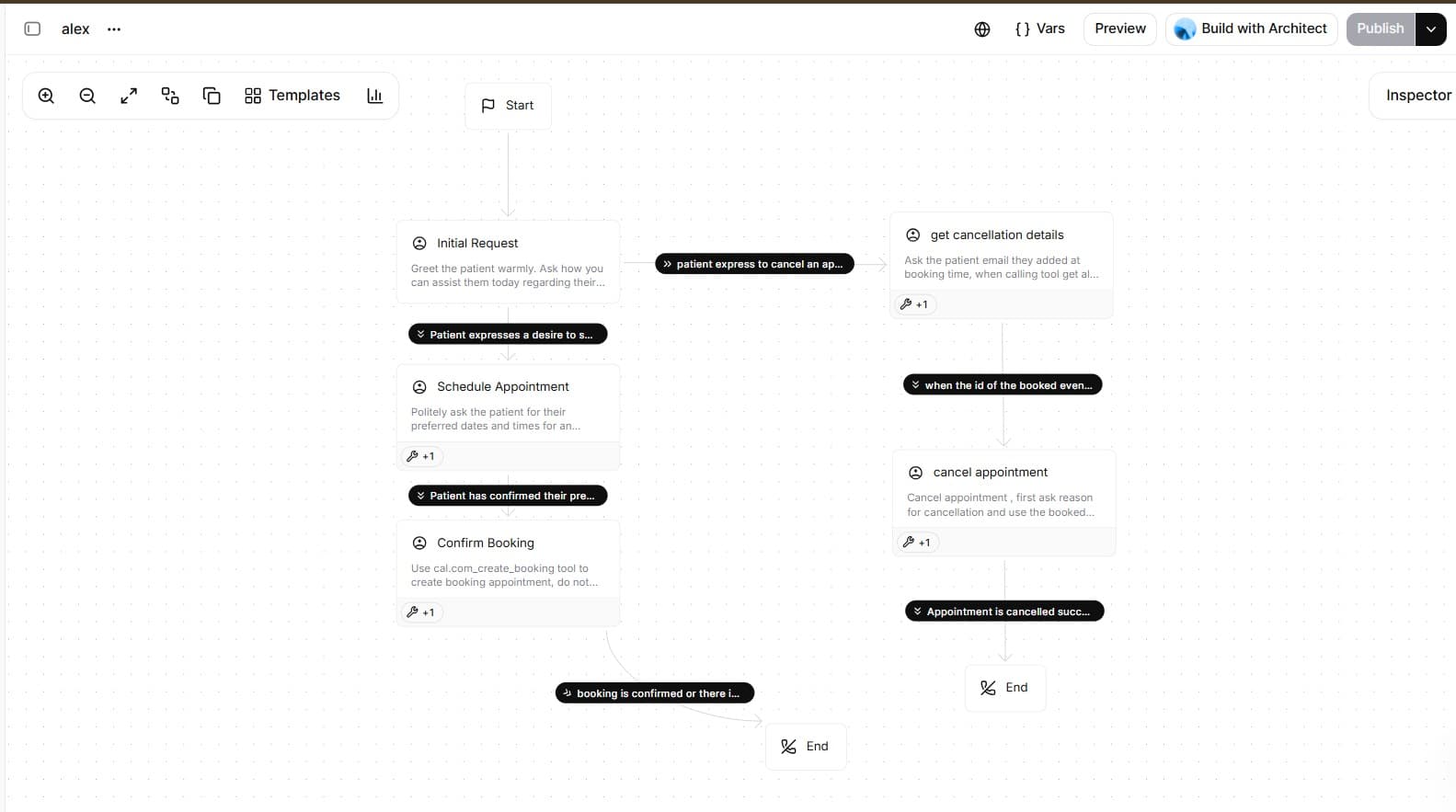
An ElevenLabs voice agent answers the call, understands what the patient needs, and, for a booking, checks live availability and confirms a slot before the call ends.
Demo: Real Recorded Call
A real recorded call with the voice agent is embedded above, in the AI Voice Agent section. Press play to hear the actual conversation flow.
Voice in
Retell AI captures the call and streams audio through a custom LLM prompt chain.
Slot fetch
The booking branch hits cal.com REST API mid-conversation for live availability.
Booking
Agent confirms available slot and creates the calendar appointment in real time.
Confirm
Full conversation state is logged to Supabase; agent reads back confirmed booking.
Handoff
Complex queries escalate to a live agent, and the call transfers seamlessly via Retell AI.
Tools the agent calls: Cal.com via API key
Automation Backend
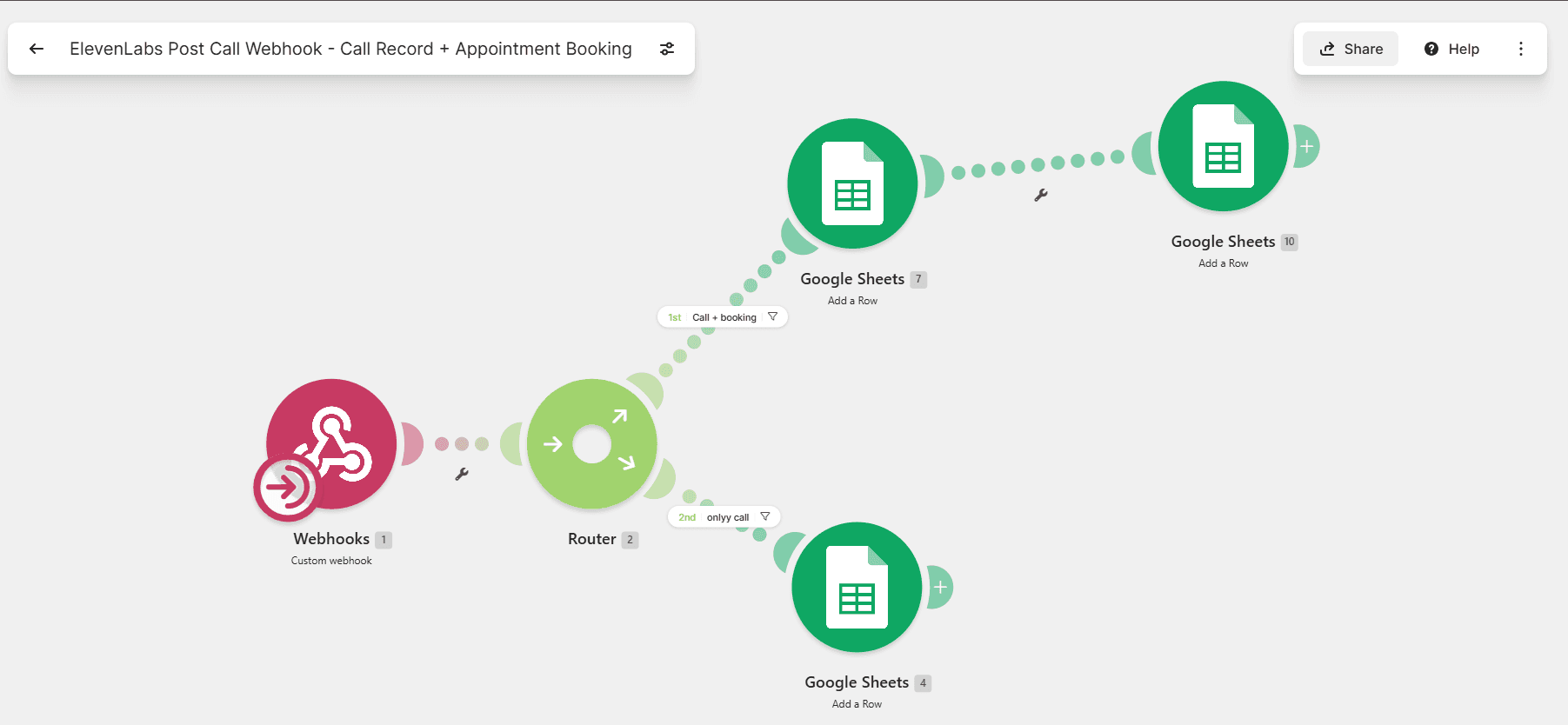
When the call ends, ElevenLabs fires a webhook into Make.com, which routes the outcome through five scenarios (booking, analysis, reactivation, and content), each writing to a shared Google Sheet and, where it matters, alerting the team in Slack.
Make.com Workflows
Five scenarios, each triggered by a different call outcome.
Post-Call Webhook Router
Receives the ElevenLabs webhook the moment a call ends, parses the outcome field, and fans out to all downstream scenarios.
Error handling
Malformed or empty payload
Returns HTTP 200 immediately so ElevenLabs does not retry-loop, then logs the raw body to a Failed Calls row for inspection.
Unrecognised outcome value
Falls back to an "unresolved" branch: the row is written with status=unknown so nothing is silently dropped.
Booking Logger
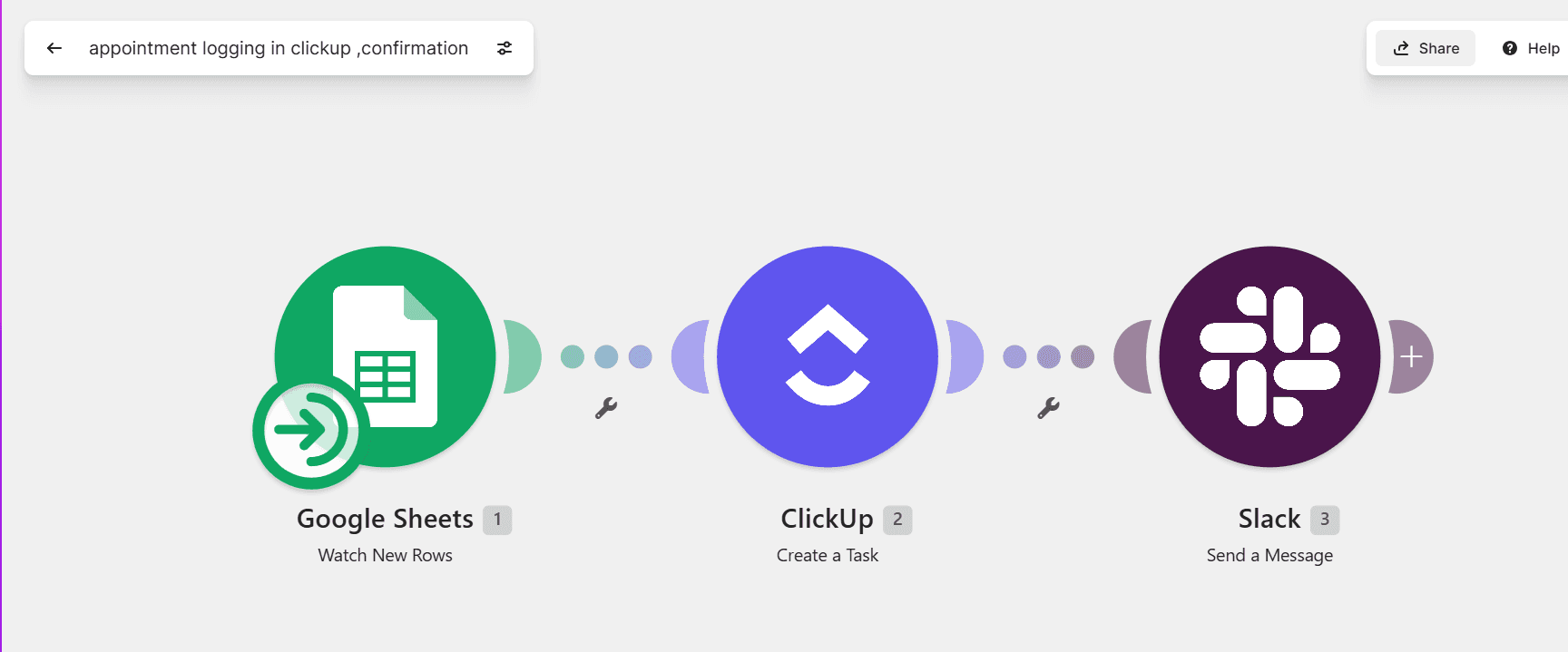
Fires on the "booked" branch, writing appointment details to the Appointment Table and sending a Cal.com confirmation.
Error handling
Patient calls twice, both trigger the booked branch
Search-before-insert matches on phone number, so the second call updates the existing row instead of creating a duplicate booking.
Cal.com API returns a 4xx error
Make.com retries 3× with 30s gaps; if all fail, status=booking_failed is written and an email alert is sent.
Call Analyzer
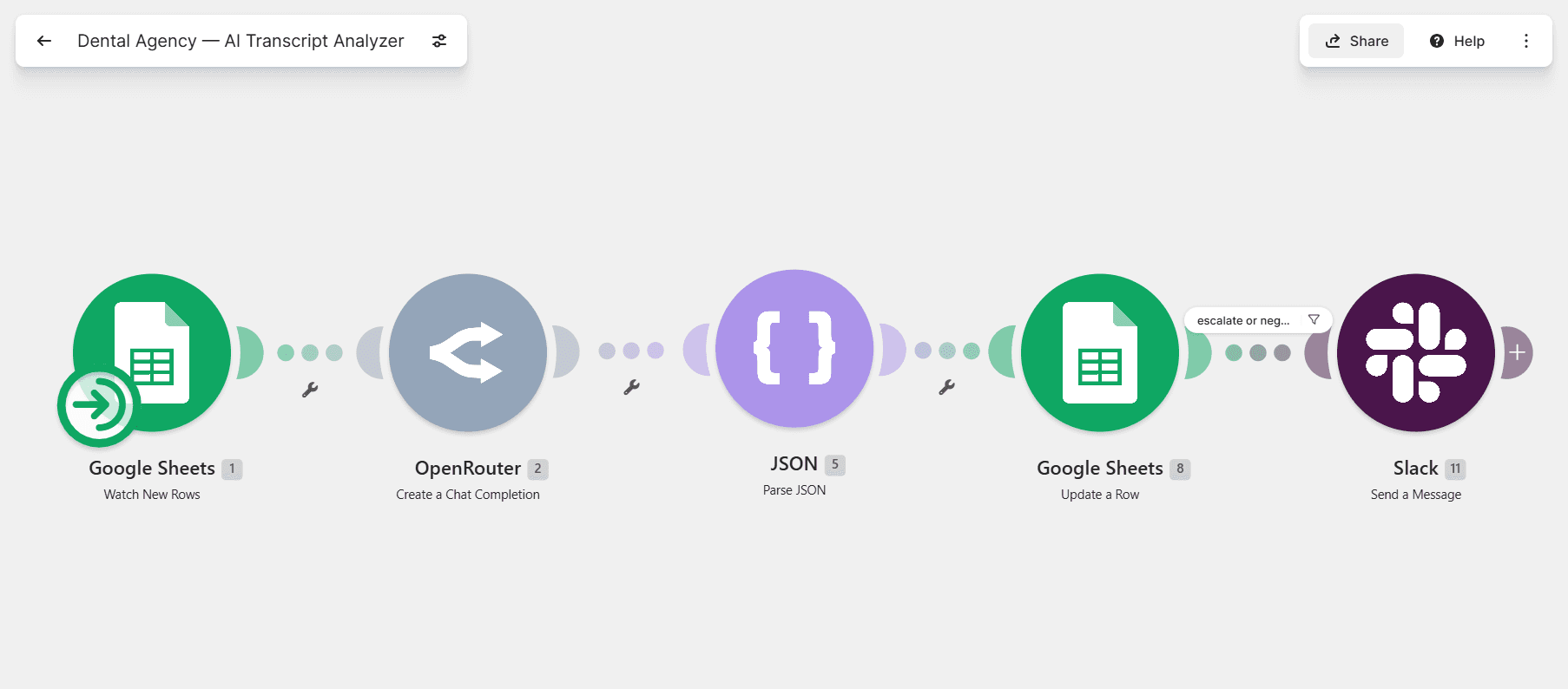
Sends the full transcript to OpenRouter, extracts sentiment, outcome label, and a confidence score, and writes results to the Call Record.
Error handling
OpenRouter timeout or 5xx error
Retries 3× with exponential backoff. On the third failure it writes sentiment=pending and sends an email alert.
Confidence score below 0.7
The row is flagged review_needed=true, and a filter view in the sheet surfaces low-confidence records for human review.
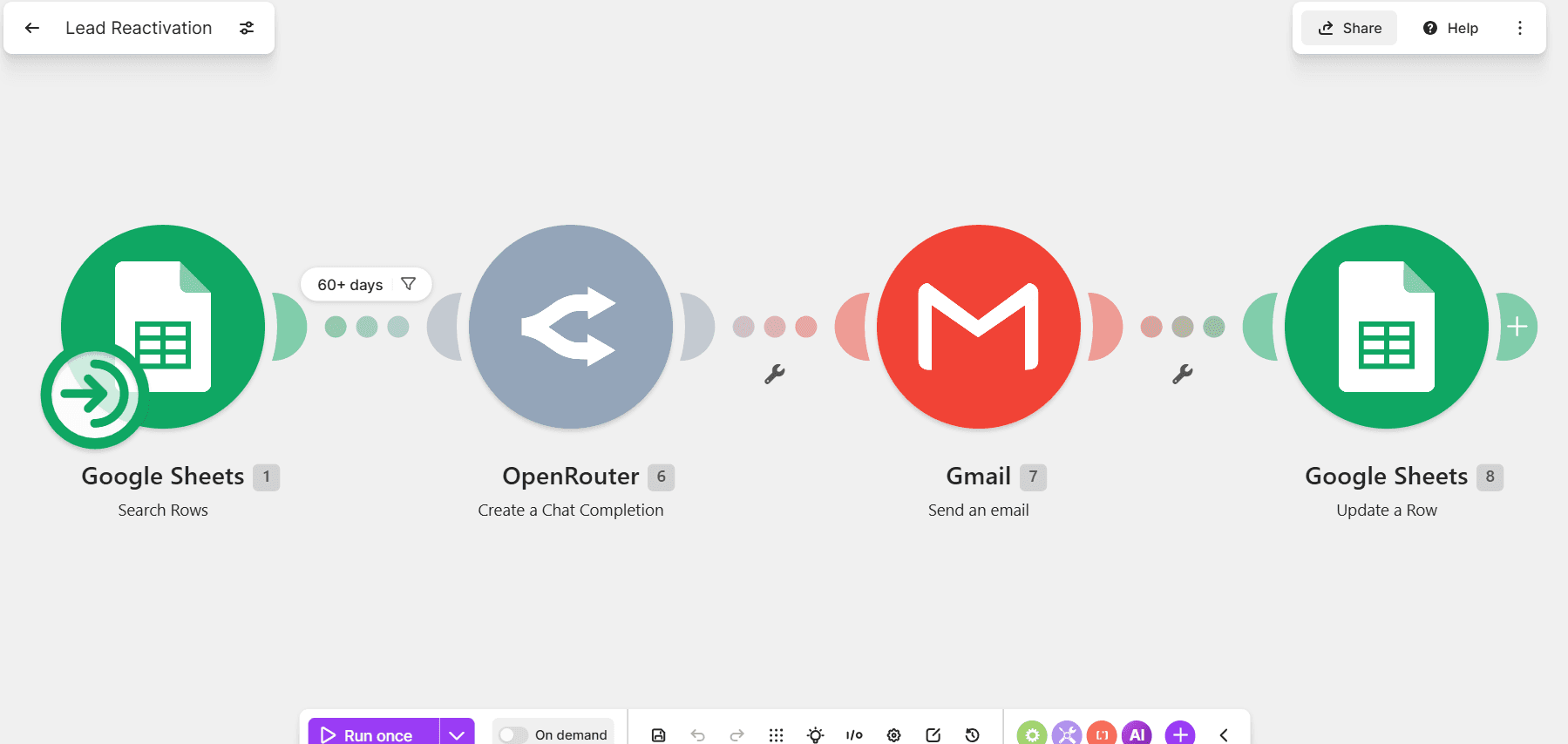
Lead Reactivation
Polls the Patient Table for unconverted leads and sends a Twilio SMS on a 3-attempt cadence spaced 24 hours apart.
Error handling
Twilio delivery failure
attempt_count is incremented and retry_at is set to +24h. The lead stays in the active queue until the attempt limit is reached.
attempt_count reaches 3
Status is marked exhausted and the row is removed from the retry filter, so the lead is never contacted again automatically.
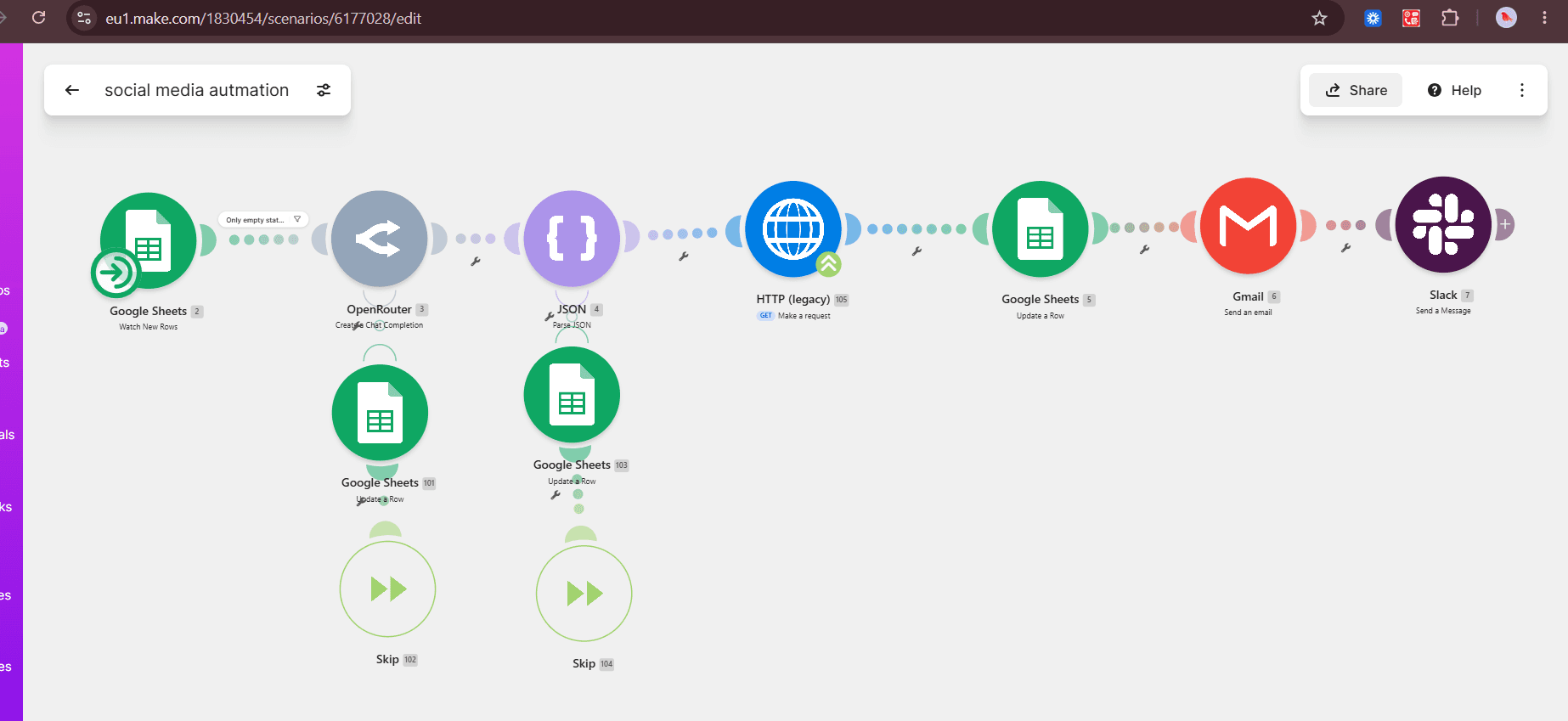
Content Generator
Converts positive call outcomes into AI-drafted social posts via OpenRouter, exporting 3 image sizes per post to the Social Media Draft sheet.
Error handling
OpenRouter returns blank copy
The row is written with status=draft_failed, and a dedicated filter view surfaces it so a human can trigger a manual retry.
All 3 image exports fail
status=images_pending is written; the copy is still usable so the post isn’t blocked while images regenerate.
Google Sheets: Live Data
One spreadsheet, four tabs. Every workflow reads and writes here.
Patient Table
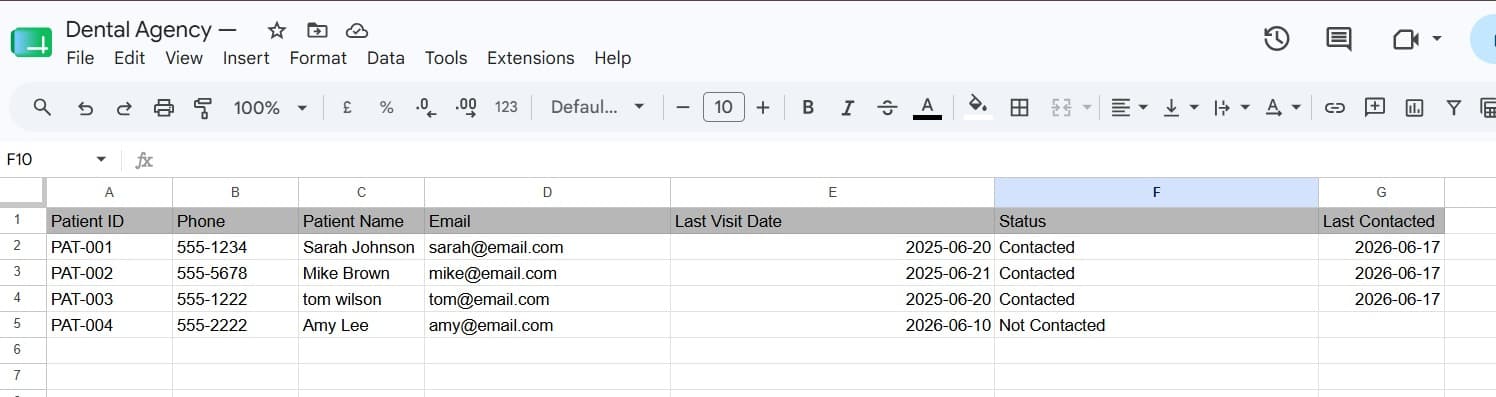
Call Record
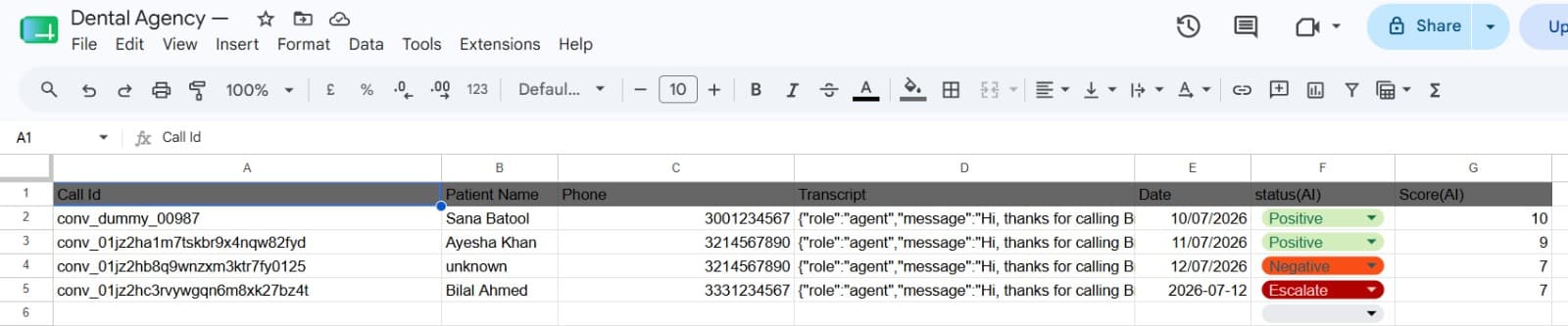
Appointment Table
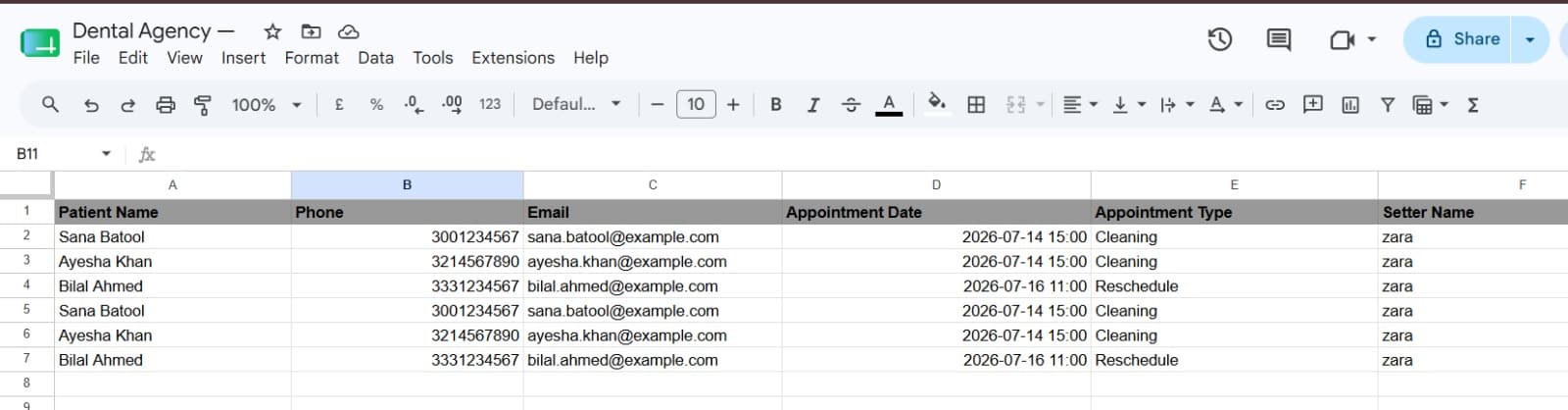
Social Media Draft

Real Outputs
What the system actually produces when it runs, captured directly from the live deployment.
Escalated call, Slack alert

Social post draft, Slack alert
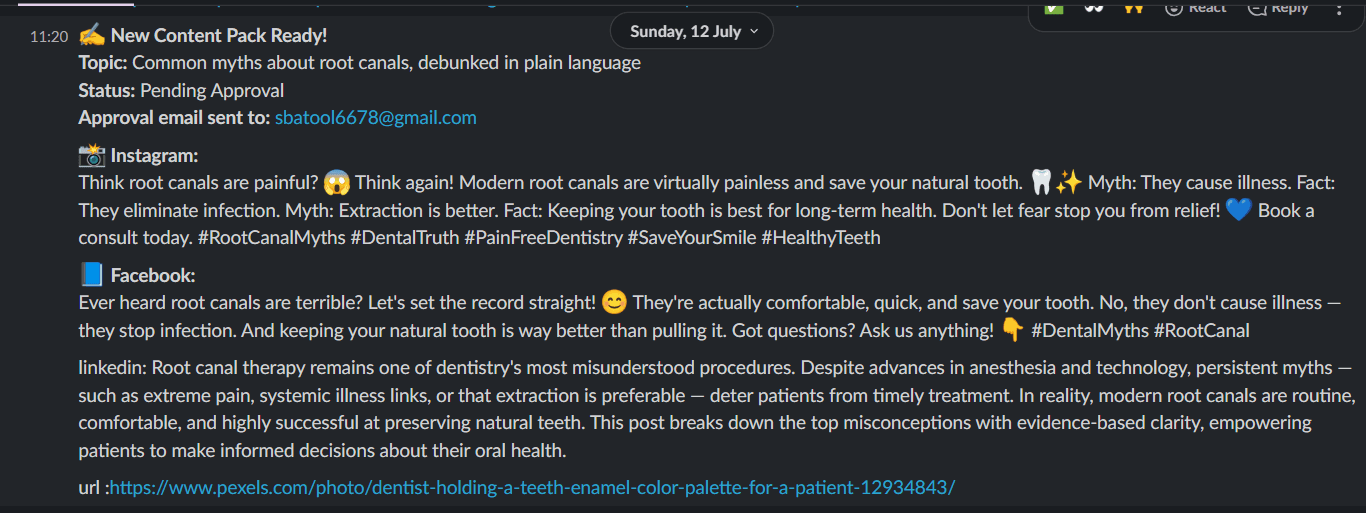
Generated Instagram post

System Architecture
One connected path from an incoming phone call to a completed, logged, and, where needed, escalated business action.
Tools & Integrations
Every tool below is live in this system today. Nothing here is a planned or future integration.
Voice AI
Automation
Database
 Google Sheets
Scheduling
 Cal.com
Communication
 SlackGmail
AI Processing
What This System Handles
Capability-based, not performance-based: this is what the system does, not a claimed result.
AI call handling
Answers incoming calls, understands intent, and carries the conversation through to a resolution.
Appointment information collection
Captures patient name, contact details, and the reason for the call before booking.
Automated workflow execution
Triggers the correct Make.com scenario (booking, reactivation, analysis, or content) based on the call outcome.
Data organization
Writes structured records to Google Sheets across four connected tabs: patients, calls, appointments, and content drafts.
Team notifications
Sends Slack alerts for escalations and new bookings so the front desk stays in the loop in real time.
Follow-up workflows
Re-engages unconverted leads on a scheduled SMS cadence without manual tracking.
Technical Details
Most agencies show the happy path. This is what happens when a step fails: the part of the system that actually gets tested in production.
Every Make.com scenario has an explicit failure branch. A bad payload, a timed-out API call, or a duplicate webhook delivery never silently drops data; it’s logged, flagged, or retried on a defined schedule.
Duplicate protection runs on phone number and call_id across every write path, so a patient calling twice or a webhook firing twice can’t create duplicate bookings or duplicate records.
Low-confidence AI outputs (sentiment analysis below a 0.7 threshold, failed content generation) are flagged for human review rather than written as if they were certain.
Retry logic is scoped per integration: Cal.com gets 3 retries with 30-second gaps, OpenRouter gets exponential backoff, because different APIs fail differently.
Frequently Asked Questions
Straight answers to the questions we hear most before a consultation.
What was built in this AI automation project?+
An AI voice agent (ElevenLabs) that answers, understands, and books calls for a dental practice, connected to a Make.com automation backend that logs every call outcome, manages appointments through Cal.com, tracks records in Google Sheets, and alerts the team in Slack.
Which tools were used?+
ElevenLabs for the voice agent, Make.com for automation, Cal.com for scheduling, Google Sheets for data storage, OpenRouter for call analysis and content generation, and Slack/Twilio for notifications.
How does the workflow handle failures?+
Every scenario has a defined failure branch. Malformed payloads are logged instead of dropped, failed API calls retry on a set schedule, and anything that can’t be resolved automatically is flagged for manual review rather than silently failing.
Is this a real client implementation?+
Yes, this is a live system built for a real dental clinic client, not a demo or a concept. The screenshots, recorded call, and workflow details throughout this page are from the actual deployment.
Need a similar AI system built?
If your business handles calls, bookings, or repetitive follow-up work manually, this is the kind of system that removes it.
Book a Consultation